Yunhu — B2B After-Sales Service Platform
ROLE
Product design
TEAM
Yuhan Wu
TIMELINE
14 weeks
TOOLS
Claude code, supabase
STATUS
Exploratory MVP · User validation pending
OUTCOME / VALIDATION
Reversible edits, before/after comparison, and a timeline gallery.


The hard part
Long projects create scattered information from day one.
The owner
The owner carries the outcome and needs one clear view of progress, documents and next actions.
The three calls
Report corrosion quickly. Keep project work visible. Keep each project record together.
Problem
Corrosion can be documented. Project work is harder to coordinate.
Owners of bridges, terminals and steel assets need to coordinate evidence, progress and decisions across teams.
Messages, spreadsheets, documents and site photos make the current state hard to see.
Reports, updates and documents often start in separate places.
Scattered project info
Information is spread across messages, documents and photos.
Unclear next actions
A report does not always make the next step clear.
Opaque project progress
Owners lack one shared view of stage, tasks and status.
Persona
A proto-persona based on desk research, created to frame the initial product direction and still requiring validation.
He keeps the project moving while technical work is distributed across teams.
01
Capture the issue clearly.
Submit details, notes and site photos, even before a Yunhu project exists.
02
Know what happens next.
See stage, pending tasks and next action in one place.
03
Keep the project record together.
Keep progress, documents, field evidence and communication with the project.

Research
Design the most important features first.
Desk research, journey mapping and wireframes narrowed the product to two focused entry points. Iteration removed features that did not help the core job.
Research
Desk research, competitor review and a 5W scoping pass.
Who
One owner-side persona with two entry scenarios.
Findings
Scattered information, unclear next actions, opaque progress.
Validation
Flows and wireframes iterated against both entry scenarios.
The MVP demonstrates the end-to-end operating concept. User validation with owners, staff, and field teams is the next step.
SWOT
Won’t build
✕
Online shop
✕
Real-time sensors
✕
Complex calculators
Will do
✓
Photo-upload to capture the issue
✓
Curated technical knowledge
✓
Project monitoring
A smaller scope made the core workflow clearer.
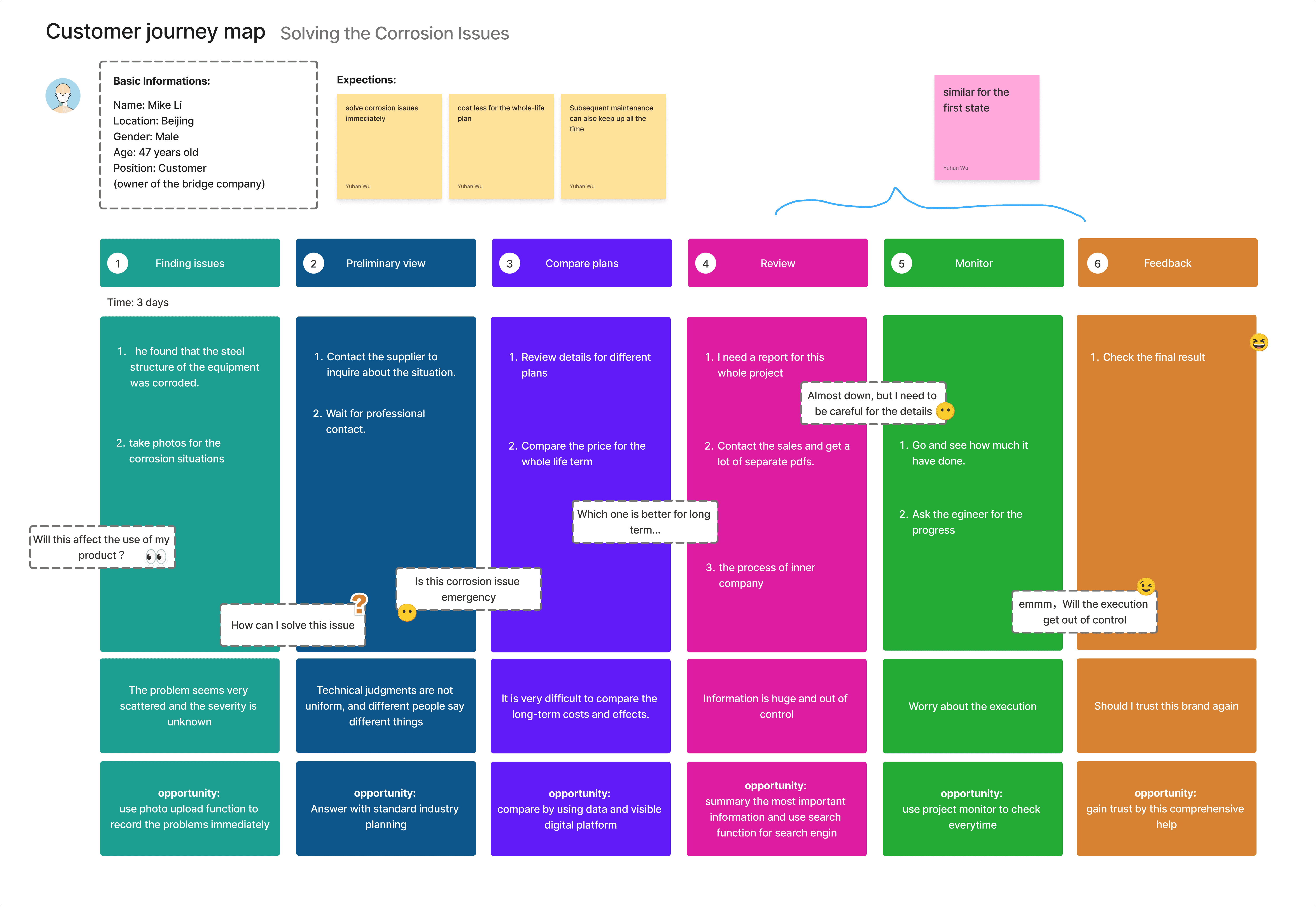
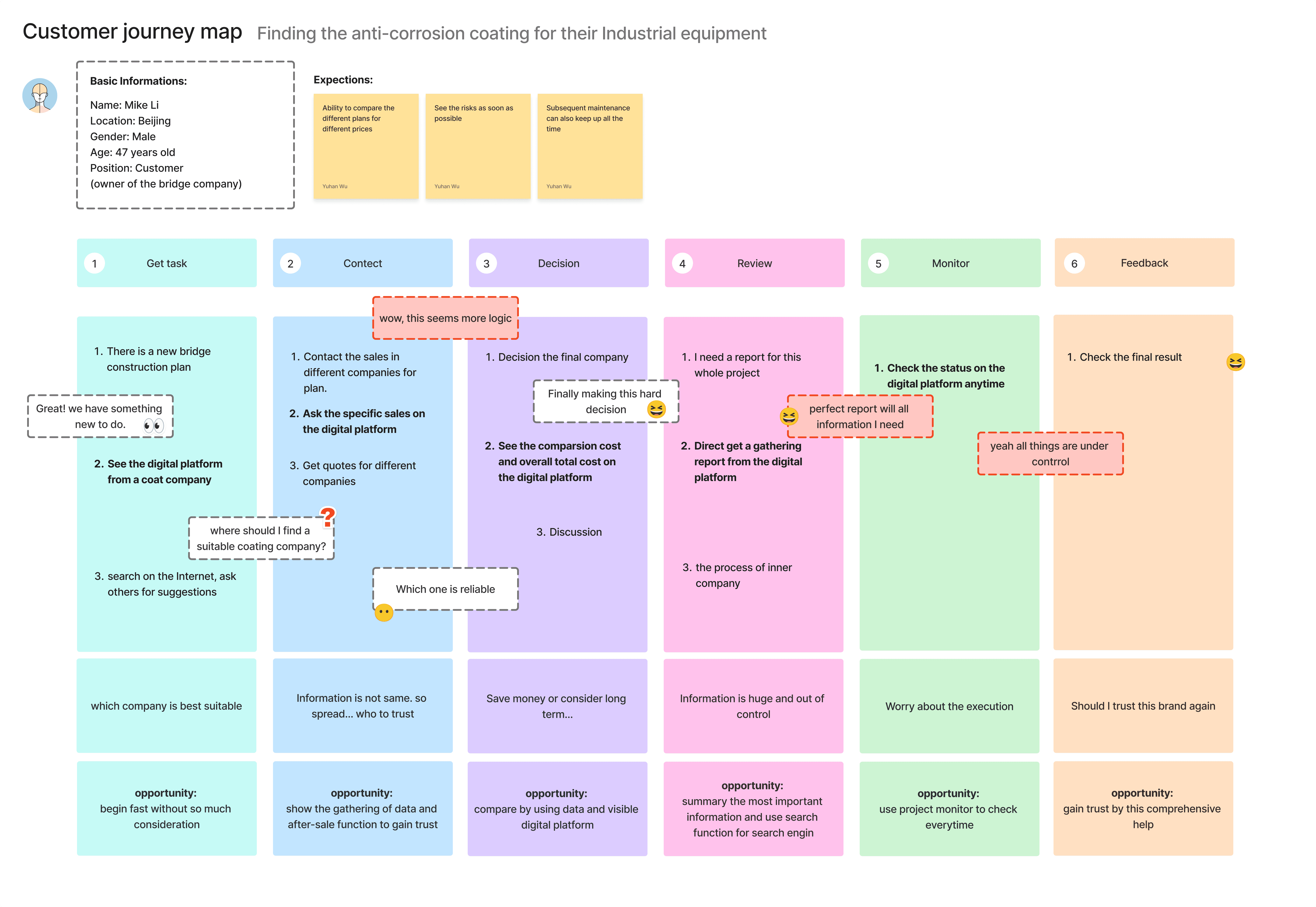
User journey
Before — traditional

After — with the app

Decisions
Three decisions shaped the product.
For each: what I chose, what I rejected, and why.
D1
Make project tracking the home base.
Chose: project tracking as the home base. Rejected: a content-first home. Why: owners need current stage and next action before anything else.
D2
Build a project workspace, not a store.
Chose: a project workspace. Rejected: a product catalogue or store. Why: the recurring job is coordination, not purchasing.
D3
Keep the project record together.
Chose: one shared project record. Rejected: separate PDFs, messages and tracking tools. Why: decisions need their evidence and context together.
Design system

Final product
A project workspace built around the next decision.
TEAM — Yuhan Wu + collaborators · TOOLS — Figma, FigJam, Framer. ROLE — Product design, UX research, and interaction design. OUTCOME — A mobile-first workspace connecting requests, progress, documents, and communication in one project record. VALIDATION — Desk research, journey mapping, and wireframes narrowed the product to two focused entry points; next step: testing with owners, staff, and field teams.

owner
Visible progress.
Owners and project teams move from the right entry point to a visible project state, without losing context.
Operating
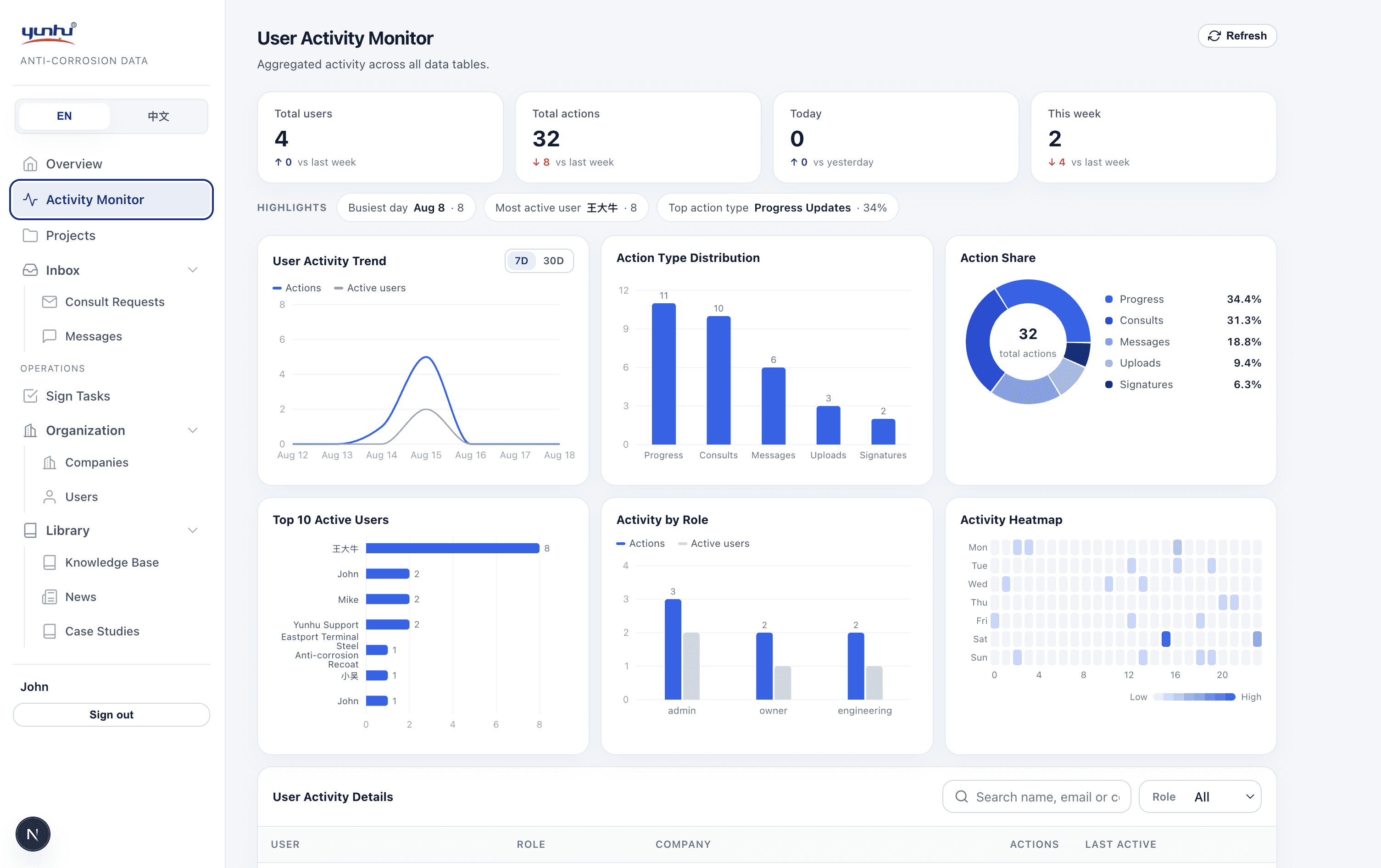
Behind the app, a staff console runs the business.
The Admin layer turns the mobile experience into an operating workflow.
Owner request
→
Admin review
→
Project created
→
Progress & documents
→
Owner tracking
Admin reviews owner requests.
Requests become tracked work.
Staff update project progress.
Status and corrections drive owner tracking.
Field teams upload evidence.
Photos and documents stay with the project.
Staff publish content.
News, knowledge and messages are managed centrally.
Owners see only their own data.
Every query is scoped to project membership — no cross-tenant leakage.
The MVP demonstrates the end-to-end operating concept.
Owners see only their assigned projects and records. Staff operate across projects from Admin.
admin
Quick management
Admin can manage all projects and assets efficiently across both mobile and desktop.


Learnings
What I learned from prototyping the MVP.
01
I first framed the product around choosing a coating. The clearer job was coordinating evidence, progress and next actions.
The owner homepage works better as a project view than a product catalogue.
02
Ownership had to be explicit before visual polish mattered.
Project membership shaped the data model and the experience.
03
The mobile app depends on the Admin operating layer.
The value is the loop from request to project to visible progress.
04
Empty, error and permission states build trust.
In a role-scoped product, boundaries are part of the experience.
Next
What I would validate next.
The MVP demonstrates the operating loop. These are the next questions, not built features.
Selection
Coating recommendation.
Validate whether lifecycle trade-offs help owners choose.
Records
Structured asset history.
Track maintenance beyond one project.
Capture
Photo-assisted assessment.
Test how much analysis a site photo can support.
Access
Partner access.
Validate scoped access for coating and inspection teams.
Evidence
Field testing.
Test the core flow with real owners and field teams.
Reporting
Operational reporting.
Help staff see workload, status and turnaround.
Scan the QR code to explore the demo.
account: admin@yunhu.com/ owner@yunhu.com
Demo account · Contains fictional data only · Read-only
